Buy beauty-lounge.eu ?
We are moving the project
beauty-lounge.eu .
Are you interested in purchasing the domain
beauty-lounge.eu ?
domain@kv-gmbh.de · 0541-91531010
Buy beauty-lounge.eu ?
Which gaming monitors with a refresh rate of 144 Hz cost less than 150 euros?
Some gaming monitors with a refresh rate of 144 Hz that cost less than 150 euros include the AOC G2490VX/BK and the Acer KG241Q. These monitors offer a high refresh rate for smooth gaming performance at a budget-friendly price. They also come with features such as AMD FreeSync technology for reduced screen tearing and a fast response time for minimal motion blur. These monitors are great options for gamers looking for a high refresh rate without breaking the bank. **
How do you divide 144 by 12 in your head?
To divide 144 by 12 in my head, I would first recognize that 12 goes into 144 evenly 12 times (12 x 12 = 144). So, the answer would be 12. **

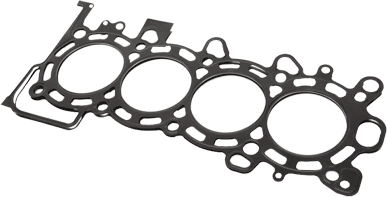
Similar search terms for ELRING-144-150-Head
Top-Angebote
Products related to ELRING-144-150-Head:
-
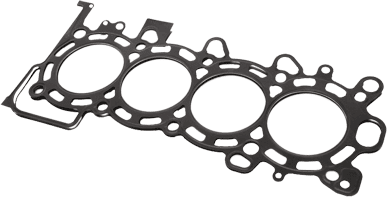
ELRING 746.902 Head gasketThickness: 0,4; Installed thickness [mm]: 0,4; Diameter: 84,5; Gasket/Seal Design: Multilayer Steel (MLS); Number of layers: 2; Additionally required article (article number): 010.230; Goods tariff number: 8484100000; Construction Year to: 01/2007, 02/2007, 09/200732,99 £*Shipping: 8,45 £Secure redirect to the provider



-
What is the best gaming monitor with speakers and a refresh rate of 144 or 165 Hz, priced around 150 euros?
One of the best gaming monitors with speakers and a refresh rate of 144 or 165 Hz priced around 150 euros is the AOC G2590FX. It offers a 144 Hz refresh rate, built-in speakers, and a Full HD display for a smooth gaming experience. With its affordable price point and solid performance, it is a popular choice among gamers looking for a budget-friendly option with high refresh rates and decent audio quality. **
-
What is the best gaming monitor with speakers and a refresh rate of 144 or 165 Hz, that costs around 150 euros?
One of the best gaming monitors with speakers and a refresh rate of 144 or 165 Hz that costs around 150 euros is the AOC G2590VXQ. This monitor offers a 24.5-inch display with a refresh rate of 144 Hz, built-in speakers, and a response time of 1ms, making it ideal for gaming. It also features AMD FreeSync technology for smooth gameplay and a slim bezel design for an immersive viewing experience. Overall, the AOC G2590VXQ provides great value for its price and is a popular choice among gamers on a budget. **
-
How to achieve a refresh rate of 144 fps?
To achieve a refresh rate of 144 fps, you will need a monitor that supports a 144 Hz refresh rate. Additionally, you will need a graphics card that is capable of producing 144 frames per second. Make sure to use a high-quality display port or HDMI cable to connect your graphics card to your monitor, as lower quality cables may not be able to support the high refresh rate. Finally, ensure that your computer's settings and in-game settings are optimized for high frame rates to fully take advantage of the 144 Hz refresh rate. **
-
Which refresh rate is better: 144 Hz or 240 Hz?
The better refresh rate depends on the specific use case and personal preference. For fast-paced gaming and competitive esports, a 240 Hz refresh rate may provide a slight advantage in terms of smoother motion and reduced motion blur. However, for most casual gaming and general use, the difference between 144 Hz and 240 Hz may not be as noticeable. Additionally, a 240 Hz monitor may come at a higher cost, so it's important to consider whether the benefits justify the price difference. **


What is the refresh rate of the 144 Hz monitor?
The refresh rate of the 144 Hz monitor is 144 times per second, meaning it can display up to 144 frames per second. This high refresh rate results in smoother and more fluid motion on the screen, making it ideal for gaming and fast-paced content. It also reduces motion blur and provides a more responsive and immersive viewing experience. **
Is 144 Hz or 144 FPS correct?
Both 144 Hz and 144 FPS are correct terminologies, but they refer to different things. 144 Hz refers to the refresh rate of a monitor, indicating how many times the screen refreshes in one second. On the other hand, 144 FPS (Frames Per Second) refers to the number of frames rendered by a graphics processing unit (GPU) in one second. Both are important for smooth and high-quality gaming experiences, with 144 Hz monitors allowing for smoother visuals when paired with a GPU capable of rendering 144 FPS. **
Top-Angebote
Products related to ELRING-144-150-Head:
-
ELRING 807.801 Head gasketThickness: 0,5; Installed thickness [mm]: 0,5; Diameter: 87,3; Gasket/Seal Design: Multilayer Steel (MLS); Number of layers: 2; Additionally required article (article number): 257.910; Goods tariff number: 8484100000; TecDoc Engine Number: 1466823,99 £*Shipping: 8,45 £Secure redirect to the provider
-
ELRING 713.183 Head gasketThickness: 1,65; Installed thickness [mm]: 1,65; Notches/Holes Number: 3; Piston Protrusion from [mm]: 1,03; Piston Protrusion to [mm]: 1,18; Diameter: 85; Gasket/Seal Design: Multilayer Steel (MLS); Number of layers: 3; Goods tariff number: 8484100000; for model code/type code: F30/31/33/34/36, F10/11, F01-04, F06/12/13, F16/25/2685,99 £*Shipping: 8,45 £Secure redirect to the provider
-
Which gaming monitors with a refresh rate of 144 Hz cost less than 150 euros?
Some gaming monitors with a refresh rate of 144 Hz that cost less than 150 euros include the AOC G2490VX/BK and the Acer KG241Q. These monitors offer a high refresh rate for smooth gaming performance at a budget-friendly price. They also come with features such as AMD FreeSync technology for reduced screen tearing and a fast response time for minimal motion blur. These monitors are great options for gamers looking for a high refresh rate without breaking the bank. **
-
How do you divide 144 by 12 in your head?
To divide 144 by 12 in my head, I would first recognize that 12 goes into 144 evenly 12 times (12 x 12 = 144). So, the answer would be 12. **
-
What is the best gaming monitor with speakers and a refresh rate of 144 or 165 Hz, priced around 150 euros?
One of the best gaming monitors with speakers and a refresh rate of 144 or 165 Hz priced around 150 euros is the AOC G2590FX. It offers a 144 Hz refresh rate, built-in speakers, and a Full HD display for a smooth gaming experience. With its affordable price point and solid performance, it is a popular choice among gamers looking for a budget-friendly option with high refresh rates and decent audio quality. **
-
What is the best gaming monitor with speakers and a refresh rate of 144 or 165 Hz, that costs around 150 euros?
One of the best gaming monitors with speakers and a refresh rate of 144 or 165 Hz that costs around 150 euros is the AOC G2590VXQ. This monitor offers a 24.5-inch display with a refresh rate of 144 Hz, built-in speakers, and a response time of 1ms, making it ideal for gaming. It also features AMD FreeSync technology for smooth gameplay and a slim bezel design for an immersive viewing experience. Overall, the AOC G2590VXQ provides great value for its price and is a popular choice among gamers on a budget. **
Similar search terms for ELRING-144-150-Head
-
ELRING 746.902 Head gasketThickness: 0,4; Installed thickness [mm]: 0,4; Diameter: 84,5; Gasket/Seal Design: Multilayer Steel (MLS); Number of layers: 2; Additionally required article (article number): 010.230; Goods tariff number: 8484100000; Construction Year to: 01/2007, 02/2007, 09/200732,99 £*Shipping: 8,45 £Secure redirect to the provider
-
ELRING 019.321 Head gasketThickness: 1,55; Installed thickness [mm]: 1,55; Notches/Holes Number: 2; Piston Protrusion from [mm]: 0,92; Piston Protrusion to [mm]: 1,03; Diameter: 84,7; Gasket/Seal Design: Multilayer Steel (MLS); Number of layers: 3; Goods tariff number: 8484100000; TecDoc Engine Number: 26347, 24405; Construction Year from: 12/2009, 09/2009, 11/2008, 02/2010, 02/2012, 10/2009; Engine Code: N47N; Vehicle type: N47S167,49 £*Shipping: 8,45 £Secure redirect to the provider
-
ELRING 027.072 Head gasketThickness: 1,27; Installed thickness [mm]: 1,27; Notches/Holes Number: 3; Piston Protrusion from [mm]: 0,601; Piston Protrusion to [mm]: 0,650; Diameter: 83,8; Gasket/Seal Design: Multilayer Steel (MLS); Number of layers: 3; Additionally required article (article number): 027.850; Goods tariff number: 848410000026,99 £*Shipping: 8,45 £Secure redirect to the provider
-
How to achieve a refresh rate of 144 fps?
To achieve a refresh rate of 144 fps, you will need a monitor that supports a 144 Hz refresh rate. Additionally, you will need a graphics card that is capable of producing 144 frames per second. Make sure to use a high-quality display port or HDMI cable to connect your graphics card to your monitor, as lower quality cables may not be able to support the high refresh rate. Finally, ensure that your computer's settings and in-game settings are optimized for high frame rates to fully take advantage of the 144 Hz refresh rate. **
-
Which refresh rate is better: 144 Hz or 240 Hz?
The better refresh rate depends on the specific use case and personal preference. For fast-paced gaming and competitive esports, a 240 Hz refresh rate may provide a slight advantage in terms of smoother motion and reduced motion blur. However, for most casual gaming and general use, the difference between 144 Hz and 240 Hz may not be as noticeable. Additionally, a 240 Hz monitor may come at a higher cost, so it's important to consider whether the benefits justify the price difference. **
-
What is the refresh rate of the 144 Hz monitor?
The refresh rate of the 144 Hz monitor is 144 times per second, meaning it can display up to 144 frames per second. This high refresh rate results in smoother and more fluid motion on the screen, making it ideal for gaming and fast-paced content. It also reduces motion blur and provides a more responsive and immersive viewing experience. **
-
Is 144 Hz or 144 FPS correct?
Both 144 Hz and 144 FPS are correct terminologies, but they refer to different things. 144 Hz refers to the refresh rate of a monitor, indicating how many times the screen refreshes in one second. On the other hand, 144 FPS (Frames Per Second) refers to the number of frames rendered by a graphics processing unit (GPU) in one second. Both are important for smooth and high-quality gaming experiences, with 144 Hz monitors allowing for smoother visuals when paired with a GPU capable of rendering 144 FPS. **
* All prices are inclusive of VAT and, if applicable, plus shipping costs. The offer information is based on the details provided by the respective shop and is updated through automated processes. Real-time updates do not occur, so deviations can occur in individual cases. ** Note: Parts of this content were created by AI.